Terraform and AWS Organizations: Separate Governance from Provisioning in Multi-Account AWS
Terraform and AWS Organizations: Separate Governance from Provisioning in Multi-Account AWS
Multi-account AWS gets messy when one layer tries to do every job. This guide shows a tighter pattern: use AWS Organizations for boundaries and guardrails, and use Terraform to provision into member accounts through explicit cross-account roles.
TL;DR
A strong multi-account AWS design starts by separating governance from provisioning. AWS Organizations should define account boundaries, OUs, and service control policy guardrails, while Terraform should run from a controlled execution layer and assume roles into member accounts. That keeps the management account thin, makes policy scope easier to reason about, and gives each environment its own state and blast radius. If you need account vending at scale, Account Factory for Terraform helps with account provisioning and customization, but it is not a substitute for disciplined workload Terraform.
The Hard Part Is Not “How Do I Use Terraform Across Many AWS Accounts?”
The hard part is deciding which layer owns which responsibility.
AWS and HashiCorp documentation point to a more practical structure: use AWS Organizations to define boundaries and guardrails, and use Terraform to provision into those boundaries through explicit role assumptions and separate state.
That shift matters because AWS is clear on two points that change the operating model:
- AWS recommends using multiple accounts to support workload and security isolation.
- Service control policies apply to member accounts, but they do not affect users or roles in the management account.
If you treat the management account as a normal execution environment for everything, your strongest organization-wide guardrail layer stops applying where your most powerful automation runs. That is not a Terraform problem. It is a boundary problem.
Key facts from the docs:
- AWS recommends account-level separation as a core multi-account design principle.
- AWS advises using the management account only for tasks that must be performed there.
- SCPs set maximum permissions for member accounts and OUs, but not for the management account.
- Terraform supports multiple provider configurations and
assume_role, which is the cleanest way to target member accounts from a controlled execution layer.
Start With AWS Organizations, Not With a Terraform Folder Structure
AWS Organizations gives you the primitives to model governance:
- the organization itself
- organizational units
- member accounts
- organization-level policies such as SCPs
That is the right place to answer questions like:
- Which accounts belong in production versus non-production?
- Which accounts are shared services, security, or logging accounts?
- Which guardrails should attach at the OU level versus the account level?
The AWS whitepaper on organizing your AWS environment also recommends thinking in terms of purpose-built accounts rather than one large shared account with naming conventions. That is a stronger default because the AWS account is already a billing, quota, and isolation boundary.
This is also where the management account needs discipline. AWS explicitly recommends using it only for tasks that require it. In other words, the management account should stay thin. It is where you define organization structure and root-level controls, not where you casually run broad infrastructure pipelines just because it can see everything.
That leads to a simpler pattern:
- Use AWS Organizations to define account topology and OU structure.
- Attach SCP guardrails at the OU or account boundary where they actually belong.
- Use delegated administration where supported so the management account does not become the operational home for every service.
- Run Terraform from a dedicated execution layer that assumes roles into member accounts.
That pattern is easier to reason about than “one repo, one root account, lots of provider magic.”
Terraform Should Cross Account Boundaries Explicitly
Terraform is at its best when the target account is explicit in configuration.
HashiCorp’s AWS provider documentation and AssumeRole tutorial support a straightforward cross-account model: authenticate in one place, then assume a role in the target account for the actual resource operations. That keeps access reviewable and makes the trust boundary visible in code.

A simple example looks like this:
provider "aws" {
  alias  = "network_prod"
  region = "eu-west-1"

  assume_role {
    role_arn = "arn:aws:iam::123456789012:role/TerraformExecutionRole"
  }
}

module "network_prod" {
  source = "./modules/network"

  providers = {
    aws = aws.network_prod
  }

  vpc_cidr = "10.20.0.0/16"
}
The important point is not the syntax. The important point is the boundary:
- the execution identity is separate from the target account
- the target account exposes a purpose-built role
- the module receives the provider configuration explicitly
That is materially safer than relying on a pile of default credentials and hoping the active account is the one you meant.
HashiCorp’s provider-in-modules guidance also matters here. If a child module needs a non-default provider configuration, pass it explicitly from the root module. That avoids hidden behavior and makes multi-account intent visible at the composition layer instead of burying it inside a module.
If you need the trust relationship itself to be reviewable in code, the HashiCorp tutorial also shows the destination-account side of the pattern:
data "aws_caller_identity" "source" {
  provider = aws.source
}

data "aws_iam_policy_document" "assume_role" {
  provider = aws.destination

  statement {
    actions = ["sts:AssumeRole"]

    principals {
      type        = "AWS"
      identifiers = ["arn:aws:iam::${data.aws_caller_identity.source.account_id}:root"]
    }
  }
}
That example is useful because it makes the trust edge explicit. The source account and destination account are not just comments in a repository. They are encoded in the provider wiring and the role trust policy.
Treat Terraform State as a Boundary, Not as a Convenience File
One of the weakest patterns in multi-account AWS is using one oversized state layout because it feels operationally simple. It is usually simple only until the first access review, failed apply, or partial migration.
HashiCorp’s S3 backend documentation gives the practical ingredients for safer remote state:
- store state in S3
- enable bucket versioning so recovery is possible
- use state locking
For a multi-account model, the deeper lesson is that state should align with real ownership and blast radius boundaries. Production networking in one member account should not share the same state file as non-production application infrastructure in another account just because both happen to live in the same repository.
A tighter backend pattern looks like this:
terraform {
  backend "s3" {
    bucket       = "org-terraform-state"
    key          = "prod/network/eu-west-1/terraform.tfstate"
    region       = "eu-west-1"
    use_lockfile = true
    encrypt      = true
  }
}
This does not solve everything by itself, but it enforces a useful habit: the state path should tell you which boundary you are modifying. If it cannot, the layout is probably too coarse.
A practical rule is to separate state by at least:
- account
- environment
- major stack boundary such as networking, security, or shared services
That makes drift investigation, permission scoping, and incident rollback much more manageable.
Put Guardrails in OUs and Accounts, Not in Human Memory
SCPs are often described loosely as “organization permissions,” but AWS is more precise than that. They define the maximum available permissions for member accounts in an organization, including attached OUs. They do not grant permissions by themselves, and they do not constrain the management account.
That means SCPs are most useful when you use them to encode baseline restrictions that should survive team turnover and repo restructuring. For example:
- limit the regions workloads may use
- restrict access to specific high-risk services
- require teams to stay within organizational guardrails even when an IAM policy inside the account is broader than intended
The key design insight is scope. If the control is meant to apply broadly, model it at the OU level. If it is truly account-specific, attach it there. Do not depend on every Terraform root module to remember the same organizational rule independently.
This is one reason multi-account AWS tends to work better when governance and provisioning stay separate. AWS Organizations owns the upper boundary. Terraform works inside that boundary.
Use Delegated Administration to Keep the Management Account Thin
AWS Organizations supports delegated administration so that specific member accounts can administer supported AWS services for the organization. That is not the same as moving all organization control out of the management account, but it is a valuable operating model tool.
Why it matters:
- the management account remains reserved for tasks that require it
- service-specific administration can live in designated security or infrastructure accounts
- day-two operations do not automatically pile into the most sensitive account in the organization
This is one of the places where a focused architecture beats a generic checklist. “Use AWS Organizations” is not enough. The operational question is which account performs which action, and whether that action should happen from the management account at all.
Where Account Factory for Terraform Fits
If your organization uses AWS Control Tower, Account Factory for Terraform is worth understanding, but only in the right scope.
AWS describes AFT as a framework that helps provision and customize accounts in AWS Control Tower by using Terraform. That is useful for account lifecycle workflows and baseline customization. It does not mean AFT replaces your normal infrastructure layering for application stacks, data platforms, or service-specific environments.
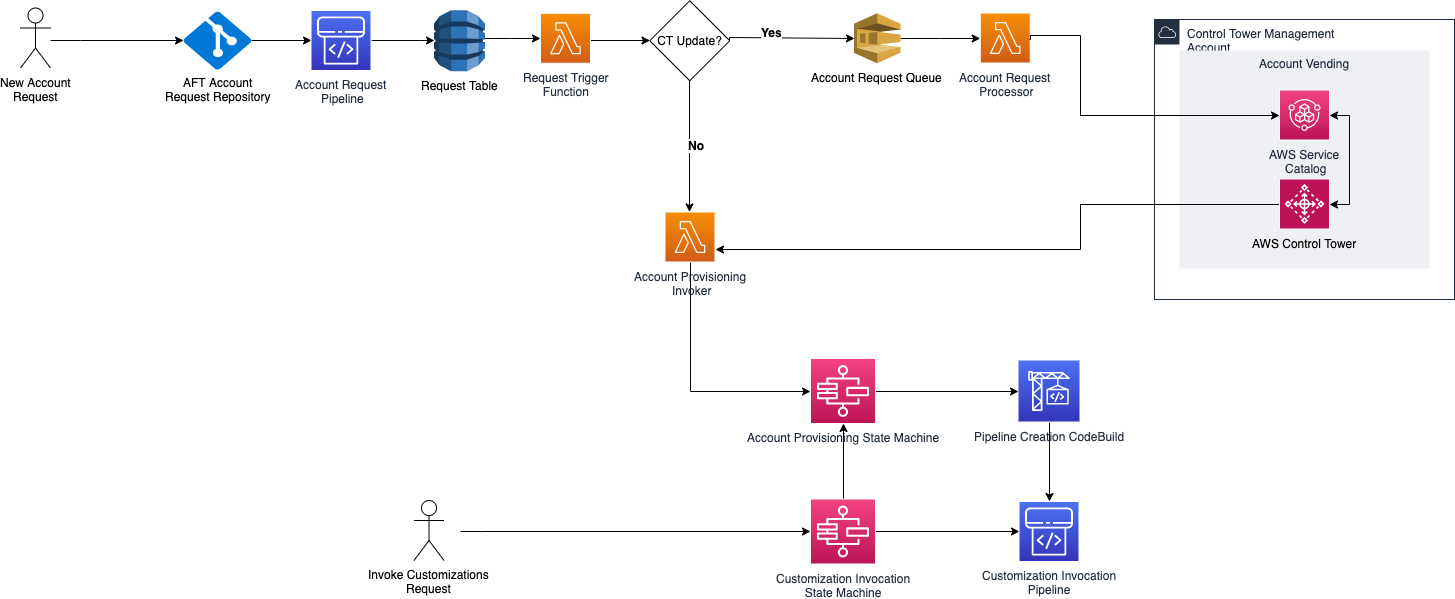
That distinction matters because teams sometimes overload “Terraform” into one giant concept:
- account vending
- landing zone customization
- workload infrastructure
- application deployment
Those are related, but they are not the same layer.
If you need governed account provisioning in a Control Tower environment, AFT is relevant. If you are deploying VPCs, databases, queues, or application infrastructure inside workload accounts, normal Terraform structure and role-based access patterns still matter.
AWS is unusually explicit on this point: the AFT pipeline is intended for automated provisioning and customization of AWS Control Tower accounts, not for deploying the application resources those accounts run. That line is what keeps your landing-zone lifecycle from becoming tangled up with workload delivery.
Why This Model Holds Up Better
The strongest insight from the docs is that multi-account AWS gets easier when you stop asking one layer to do every job.
Use this split instead:
| Layer | Primary Job | Wrong Expectation |
|---|---|---|
| AWS Organizations | account topology, OUs, guardrails | provisioning every workload resource |
| Management account | only organization tasks that require it | being the default home for broad automation |
| Delegated admin accounts | organization-scale service operations where supported | replacing OU and SCP design |
| Terraform | provisioning and updating infrastructure in target accounts | inventing the governance model after the fact |
| Remote state | representing real ownership boundaries | becoming one monolithic file for convenience |
That is more focused than the usual “use multiple accounts and add Terraform” advice, and it is more actionable because each control has a clear role.
What To Do Next
If you already have a multi-account AWS environment, the fastest cleanup path is usually:
- Review whether your management account is doing work that AWS says should live elsewhere.
- Revisit your OU design and move broad guardrails into SCPs at the correct scope.
- Define a standard
TerraformExecutionRolepattern in member accounts instead of relying on broad operator credentials. - Split oversized state into boundaries that match account, environment, and stack ownership.
- If you use AWS Control Tower, decide whether AFT should own account vending and baseline customization, while workload Terraform remains separate.
That sequence gives you a model that is easier to audit, easier to delegate, and less dependent on tribal knowledge.
Frequently Asked Questions
Q: Why should I avoid using the management account as my main Terraform execution account? AWS states that SCPs do not affect the management account. If you run broad automation there by default, you bypass the same organization-level permission guardrails you expect member accounts to follow.
Q: What is the cleanest Terraform pattern for multi-account AWS? Use explicit AWS provider configurations and assume_role into target member accounts. Then pass those provider instances deliberately into the modules that own each account boundary.
Q: How should I split Terraform state in a multi-account setup? Split it by real ownership and blast radius boundaries, at minimum by account and environment. For many teams, a further split by major stack such as networking, security, or shared services is easier to operate than one large shared state file.
Q: Does Account Factory for Terraform replace normal Terraform for workloads? No. AWS documents AFT as a way to provision and customize AWS Control Tower accounts using Terraform. It is useful for account lifecycle workflows, but it is not a substitute for disciplined Terraform design inside workload accounts.
Resources
- AWS Organizations best practices for the management account
- AWS Organizations SCP documentation
- AWS Organizations delegated administration
- AWS multi-account strategy design principles
- Terraform AWS AssumeRole tutorial
- Terraform provider configuration
- Providers within Terraform modules
- Terraform S3 backend
- Account Factory for Terraform overview


Comments
Post a Comment